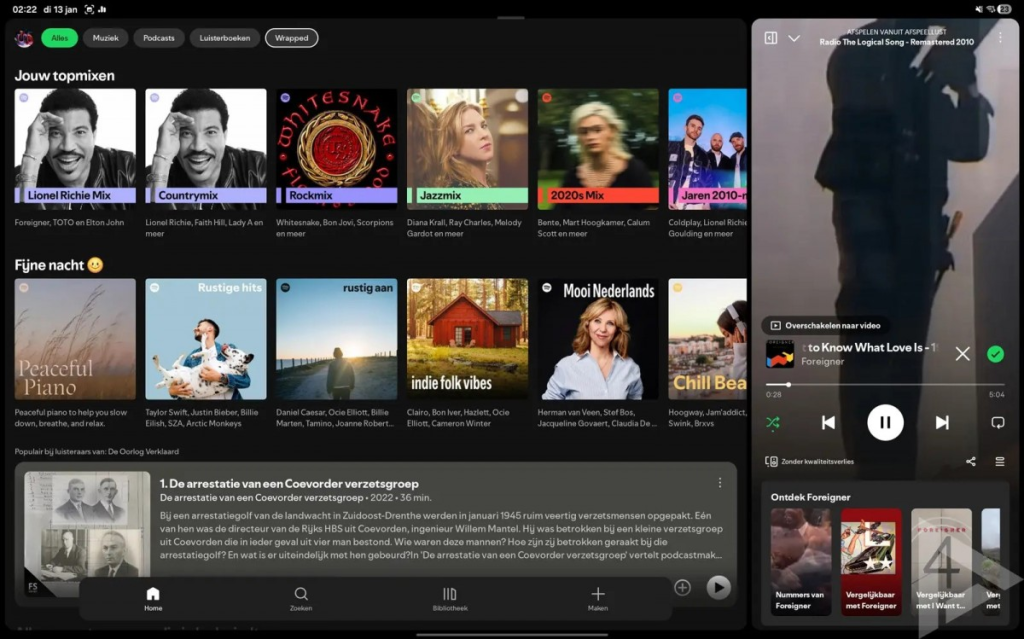
Spotify has rolled out a significant update to its Android tablet interface, offering users a fresh and more flexible playback control experience. This revamped UI enhances usability by introducing a media player that can be resized, similar to the desktop app. In addition, a new navigation bar has been added at the bottom, providing easy access to essential features like Home, Search, Library, and Create.
This update isn’t part of a beta build—it’s being rolled out to all users with an Android tablet, bringing an instant quality of life improvement for those looking to enjoy their music with more intuitive controls. By allowing users to adjust the dimensions of the media player, Spotify aims to give them greater control over their playback experience, whether they’re listening to music, podcasts, or other audio content.
Spotify’s focus on improving user interface flexibility is particularly evident in the new bottom bar. With clearly defined icons for key functions, navigation becomes smoother, and switching between sections is quicker. This update is a response to growing demand for more streamlined, tablet-friendly design, making it easier to control playback while multitasking on a larger screen.
As this new UI rolls out across Android tablets, Spotify users can look forward to a more versatile and enjoyable listening experience. Whether you’re a casual listener or a dedicated music enthusiast, the improved interface will make navigating Spotify’s features more enjoyable, especially on tablet devices.
Via (in Dutch)